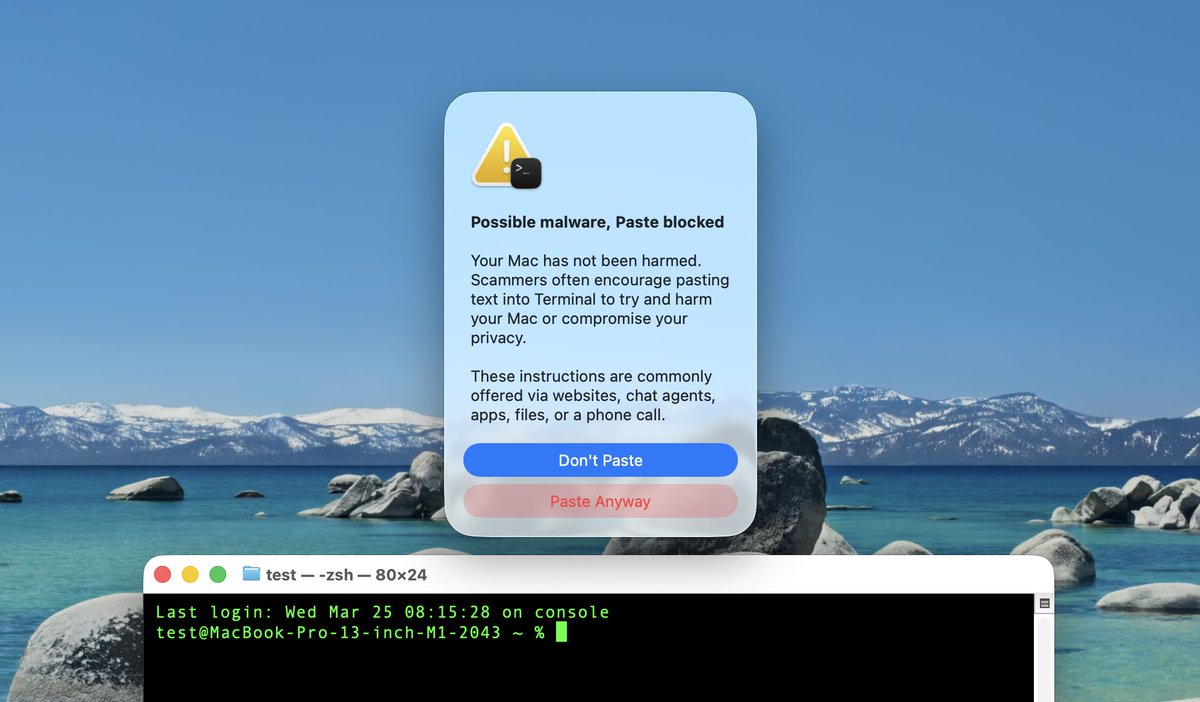
Apple recently released macOS Tahoe 26.4 and the update includes a new security feature for Mac users that may paste certain commands in the Terminal app that may be harmful.
The macOS Terminal app allows users to enter text-based commands to perform tasks on their Macs. The app is mostly used by advanced users and developers, although there have been instances of casual users being tricked into entering harmful commands that can delete files, and cause other issues, like inadvertently changing user permissions.
Users across Reddit and X over the past week report that when a Terminal user pastes text into the app’s CLI that contains certain commands, the user sees the following:
Possible malware, Paste blocked
Your Mac has not been harmed.
Scammers often encourage pasting text into Terminal to try and harm your Mac or compromise your privacy.
These instructions are commonly offered via websites, chat agents, apps, files, or a phone call.
A “Paste Anyway” option is available if the user wishes to proceed.
X user Mr. Macintosh says it looks like it only warns you once. “I tried multiple copy and pastes from different sites after the initial alert and never saw it again.”
Currently, we don’t know which commands trigger the warning or the extent of the blacklist, as the warning doesn’t always appear.