

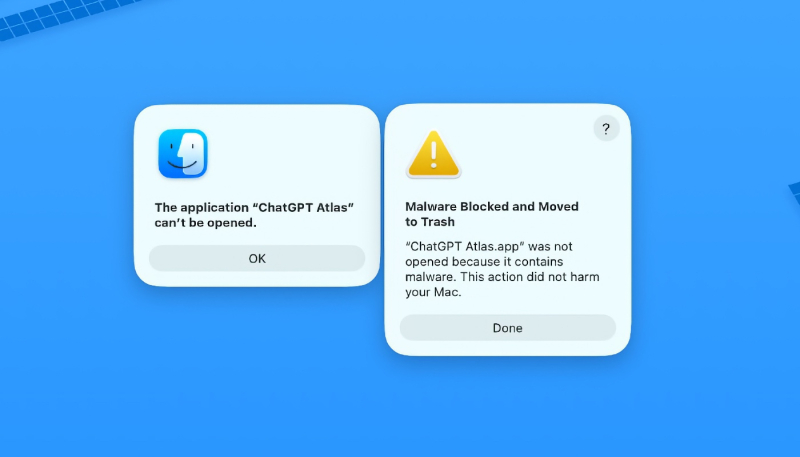
Is your Mac telling you that the ChatGPT app is malware and it’s moving it to the trash? Well, no matter what your personal opinion of ChatGPT and AI, the app isn’t malware, and there’s a way to convince your Mac of that.
The reason you’re seeing the warning is that macOS is doing its job to protect you. Starting in 2022, macOS has included a feature called Xprotect that safeguards your Mac against malware.
This is why users worldwide are reporting on social media that Xprotect had categorized the ChatGPT app as malware, refusing to launch it and automatically moving it to the Trash, reports AppleInsider.
Luckily, there is a way to fix the issue, and its actually quite simple to pull off. Reinstall ChatGPT directly from the developer.
“We recently identified a security issue involving a third-party developer tool, Axios, that was part of a widely reported, broader industry incident,” wrote OpenAI in a blog post. “Out of an abundance of caution we are taking steps to protect the process that certifies our macOS applications are legitimate OpenAI apps.”
The company had warned that the app should be updated:
Update your macOS applications by May 8th, 2026
We are updating our security certificates, which will require all macOS users to update their OpenAI apps to the latest versions. This helps prevent any risk—however unlikely—of someone attempting to distribute a fake app that appears to be from OpenAI. You can update safely through an in-app update or at the official links below:
- ChatGPT Desktop(opens in a new window)
- Codex App(opens in a new window)
- Codex CLI(opens in a new window)
- Atlas(opens in a new window)
The security and privacy of your information are a top priority. We’re committed to being transparent and taking quick action when issues arise. We’re sharing more technical details and FAQs below.
If you haven’t yet updated your ChatGPT apps, they are no longer notarized, so your Mac will refuse to run them and will toss them in the Trash. So, go update them if you haven’t already.
