

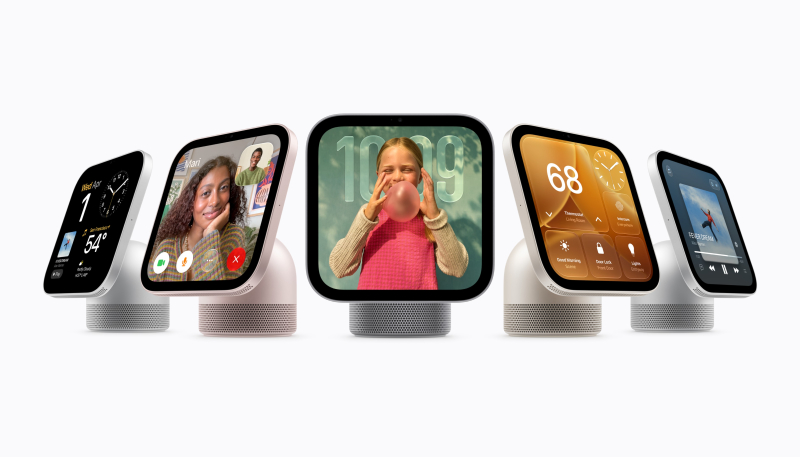
Apple’s new HomeView is set to start arriving on customers’ doorsteps on Friday, and Apple has released a new HomeView Software 27.2 update.
The software has a build number of 24V526, and it is the second 27.2 update Apple has released for the device. Apple’s security support document says the software update addresses several vulnerabilities, including issues with AirPlay, Messages, and Bluetooth.
Customers receiving the HomeView this week will need to install a software update during the setup process. As we already know, Apple’s release of the HomeView smart home hub was significantly delayed, meaning it may have been sitting in warehouses for several months. That means that the device will initially ship with six-month-old HomeView software version 26.5. Users will be prompted to update to HomeView software version 27.2 when they set up the device.
Apple also today shared an in-depth look at how it’s using Secure Exclaves to protect camera and microphone data on the HomeView and other Apple products.
Apple describes Secure Exclaves as compartmentalized runtimes that process camera and microphone data while isolated from the rest of the operating system.
Data processed in Secure Exclaves is not available to the rest of the OS, apps, or Apple, but processing can take advantage of the full application processor. Secure Exclaves power sensitive features involving video and audio feeds:
- HomeView – The HomeView uses facial and voice recognition to identify up to six people in a home. The exclave also protects the LED camera indicator on the device.
- Siri Recap and Live Rewind – Record ambient sound for conversation recaps or to caption the last 15 seconds of someone speaking.
- iPhone 18 Pro/iPhone Duo – Protects the iPhone 18 Pro, Pro Max, and Duo on-screen camera and microphone indicators. Also works with “Hey Siri” to protect voice data.
- MacBook Neo – Protects the MacBook Neo camera indicator.
For more information about how Secure Enclaves work, read the Apple document here.
