Google Gemini-generated image showing macOS 27 icon on an iMac
As we told you in June 2025, Apple announced that Rosetta 2 will only remain available through macOS 27, the Mac operating system that debuted this June at WWDC 2026. Rosetta 2 allows Apple Silicon-powered Macs to run apps that were developed to run on Mac powered by Intel processors by translating the code on the fly. The end of Rosetta 2 also means the end of using Intel-based apps on your Apple Silicon-powered Mac.
If you still use apps that make use of Rosetta, macOS warns you every time you open those apps or whenever you restart your Mac. Now, macOS 27 Golden Gate offers a way to determine all of the apps that will stop operating next year.
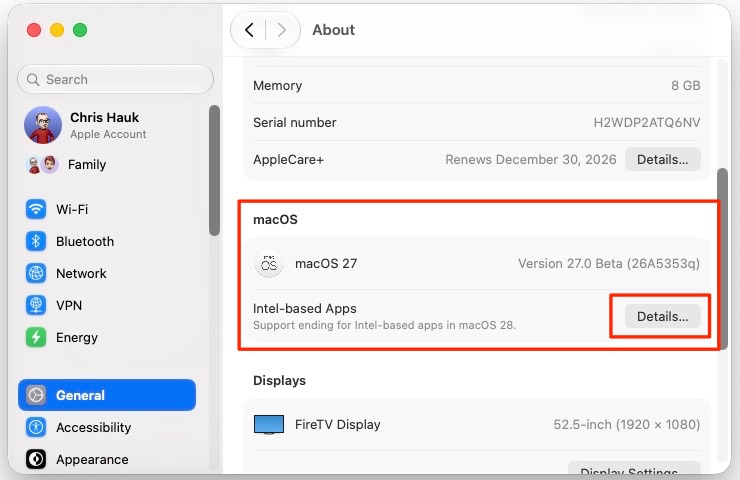
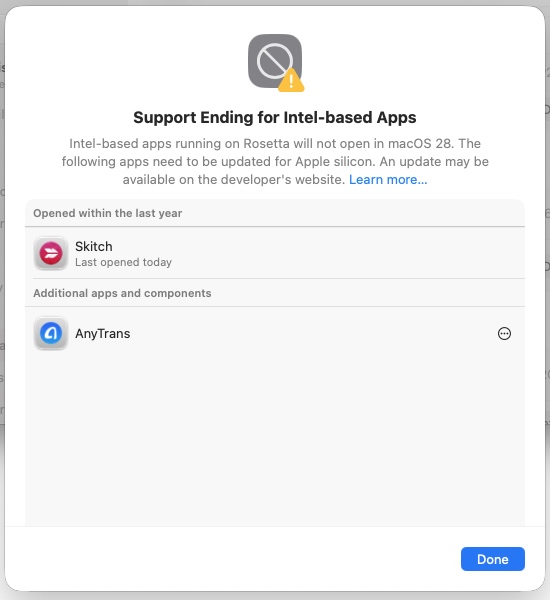
To view the list, go to “Settings” -> “General” -> “About” -> “Intel-Based apps” and clicking on the “Details” option.
You’ll then see a lists of all of the apps that are going to stop working next year.
This will provide Mac users an entire year to push app developers to update their apps, or find alternative apps. Of course, there will still be users next year, complaining of losing Rosetta 2 support. ::COUGH!:: Reddit! ::COUGH!::
After installing macOS 27 Golden Gate you’ll experience a short installation of Rosetta 2, as it is not installed by default. The installation only took a few seconds on my M1 Mac mini.