

srshot

How To: Enable Reverse Scrolling In Snow Leopard

Posted in OS X on 11/07/2011 by Cormac Moylan

6s

When OS X Lion finally arrives, it will bring with it one fairly major change; Reverse Scrolling. It’s a semi-complicated and maybe alien concept, so bear with me… reverse scrolling is basically where you scroll with your mouse (or trackpad), but in reverse.

We are accustomed to scrolling up to go up, and scrolling down to move down a web page or app with our mouse. But with OS X Lion, scrolling up will bring you down the page, while scrolling up will bring you down. That might sound weird but if you’re an iOS user you have already witnessed this “reversal” in the iPhone, iPad, and iPod Touch where gesturing up the screen brings you down and visa versa.

This new feature is one of the many ways in which Apple is bringing iOS concepts to OS X. I was skeptical at first, thinking that I would never be able to adapt to this new system of scrolling. But having used reverse scrolling for nearly a week I have taken to it like a duck to water.

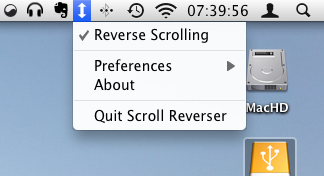
If you’re on Snow Leopard you can download and install the Scroll Reverser app to get a preview of soon to arrive feature.

Have you tried reverse scrolling with your mouse? Let us know how you got on in the comments.


  • http://coolrob335.com coolrob335

    I set up that scroll reverser app for my trackpad a while ago, and got used to it really quickly as well. Now I really like it reversed and won’t go back :D

  • Tumtum

    I’m fully adapted to ‘reversed’ scrolling. I’ve been using the tool mentioned above for a few months now. I started needing it because scrolling on my macbook after intensively using my ipad started to feel counterintuitive.

  • http://www.mactrast.com Cormac Moylan

    Yup, I’m the same as Tumtum and coolrob335. I couldn’t believe that after 10 minutes I was naturally moving down to go up and up to go down. Didn’t think I would take to it that easily. 

  • http://scheyeniam.blogspot.com ScheyenIAm

    It’s all driven by the death of the mouse wheel.  The “scroll down” methods of today were based on a mouse wheel rotating (making the content feel like it was “rotating” as well).  Touch has changed that metaphor so that stroking down on your screen or your touchpad (or Magic Mouse) is more akin to grabbing your content and making it move.  It’s more direct.

  • Amar

    thts Awesome!! i just got it the first time itself!!! And thts really the right way to do!! these long years we where doing it the reverse way!!! Apple thinks different for sure! :)

  • Pingback: Scrapeboard

Related Posts

Latest Posts

Author

Cormac Moylan

Cormac is the head honcho behind MacTrast. Based in Cork, Ireland, his first foray into the Apple world was way back in 2006 when he purchased an iMac followed by a Macbook around 4 weeks later. He currently owns a Macbook Pro, iMac, Mac Mini, iPhone 4, iPod Touch, Apple TV, and has more than 30 pairs of shoes. He is also the Head of Digital at VisiTravel - a company that lists hotels in Ireland on their GoIreland site and offer cheap car hire through NovaCarHire.