

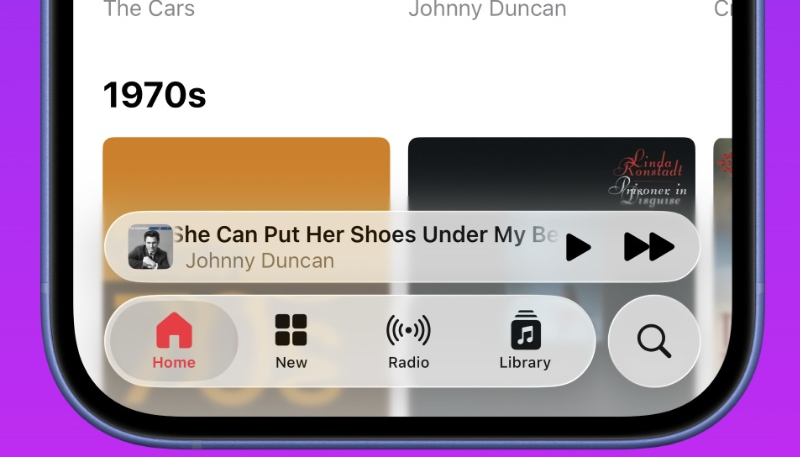
Apple seeded the third beta of iOS 26 to developers on Monday, and the most recent beta brings just a bit more of a frosted touch to Apple’s new Liquid Glass design language. iOS 26 beta 3 dials back the transparency of navigation elements, like buttons, bars, and tabs.
Apple’s move in beta 3 of iOS 26 to tone down the transparency of its Liquid Glass interface is a response to criticism from users and reviewer that it was too transparent, making it harder to see certain options, such as the icons in Control Center. In beta 3, Liquid Glass elements are just a bit more solid, improving readability. However, not everyone is pleased with the changes in Liquid Glass.
“iOS 26 beta 3 completely nerfs Liquid Glass,” AppleTrack developer Sam Kohl says in a post on X. “It looks so much cheaper now and feels like Apple is backtracking on their original vision.”
iOS 26 beta 3 completely nerfs Liquid Glass.
It looks so much cheaper now and feels like Apple is backtracking on their original vision. pic.twitter.com/WNG8O2qjeg
— Sam Kohl (@iupdate) July 7, 2025
Others say Apple is “ruining” Liquid Glass, calling the new design a “step backwards.”
iOS 26 beta 3 is a step backwards. The Liquid Glass language is now “slightly more blurry” design language. Still early in the beta phase so it will (hopefully) change. pic.twitter.com/aYwjy8CA7V
— Sami Fathi (@SamiFathi_) July 7, 2025
Meanwhile, some users found that the transparency level in the new beta can vary depending on which app they’re in.
i’m convinced there is a bug at play here, sometimes liquid glass is quite transparent and the effect is noticeable, and other times it’s very frosted. you can see it in photos pretty clearly https://t.co/PzsYAyf4KD pic.twitter.com/uorviuTe9D
— Aether (@AetherAurelia) July 7, 2025
We can likely expect to see several more changes in Liquid Glass in future beta releases, as Apple will continue to make tweaks to the operating system until it is ready for a public release in September.
